

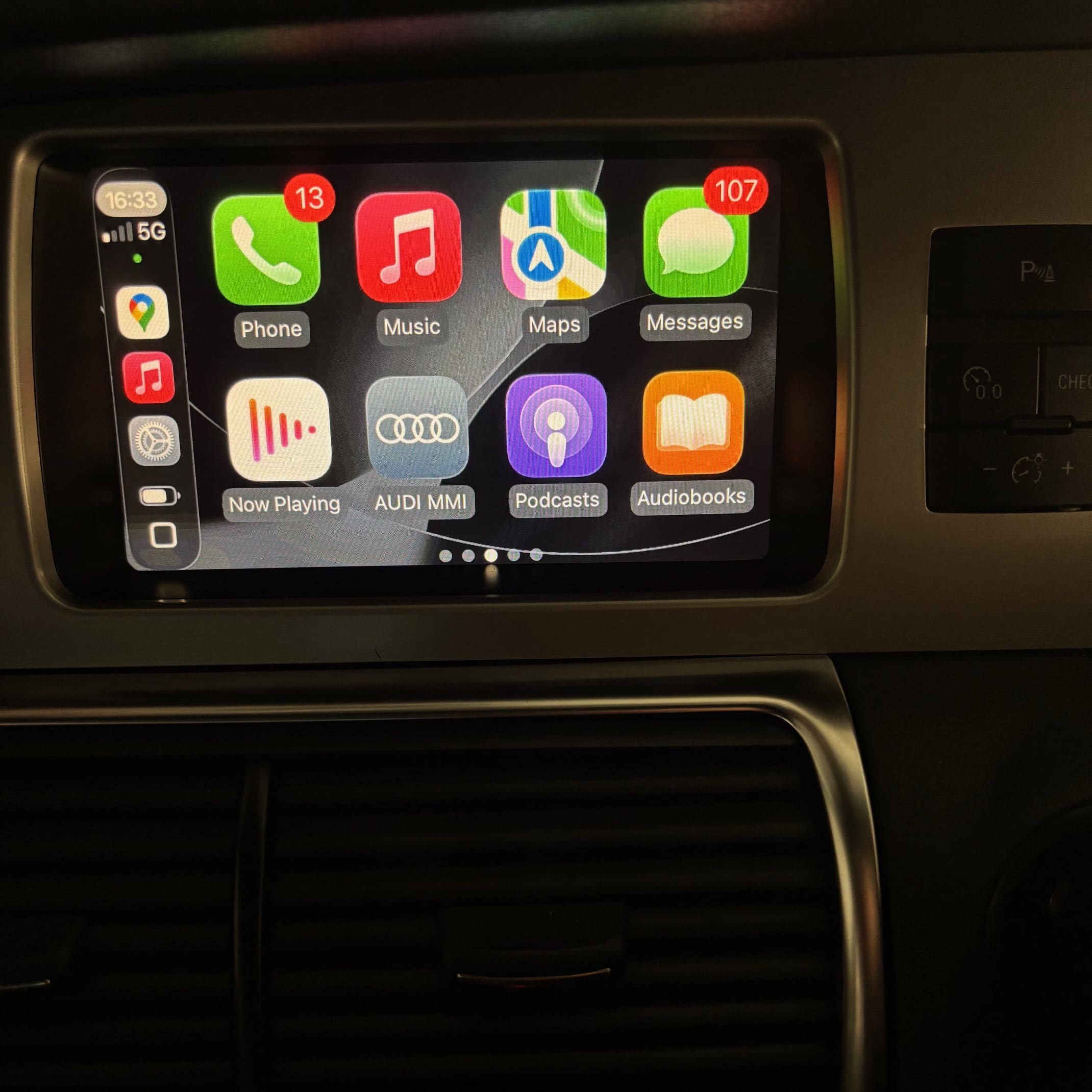
Audi Q7 CarPlay Retrofit With Wireless Wired OEM MMI Control
Mk1 V12 Audi Q7 Apple CarPlay and Android Auto Retrofit on the Factory MMI Screen
Nothing ruins a clean interior faster than a tablet-style screen stuck on top of the dash, so this Audi Q7 CarPlay retrofit focused on doing it properly: Apple CarPlay and Android Auto integrated directly into the factory MMI display on a Mk1 V12 Audi Q7, with no messy add-on units.
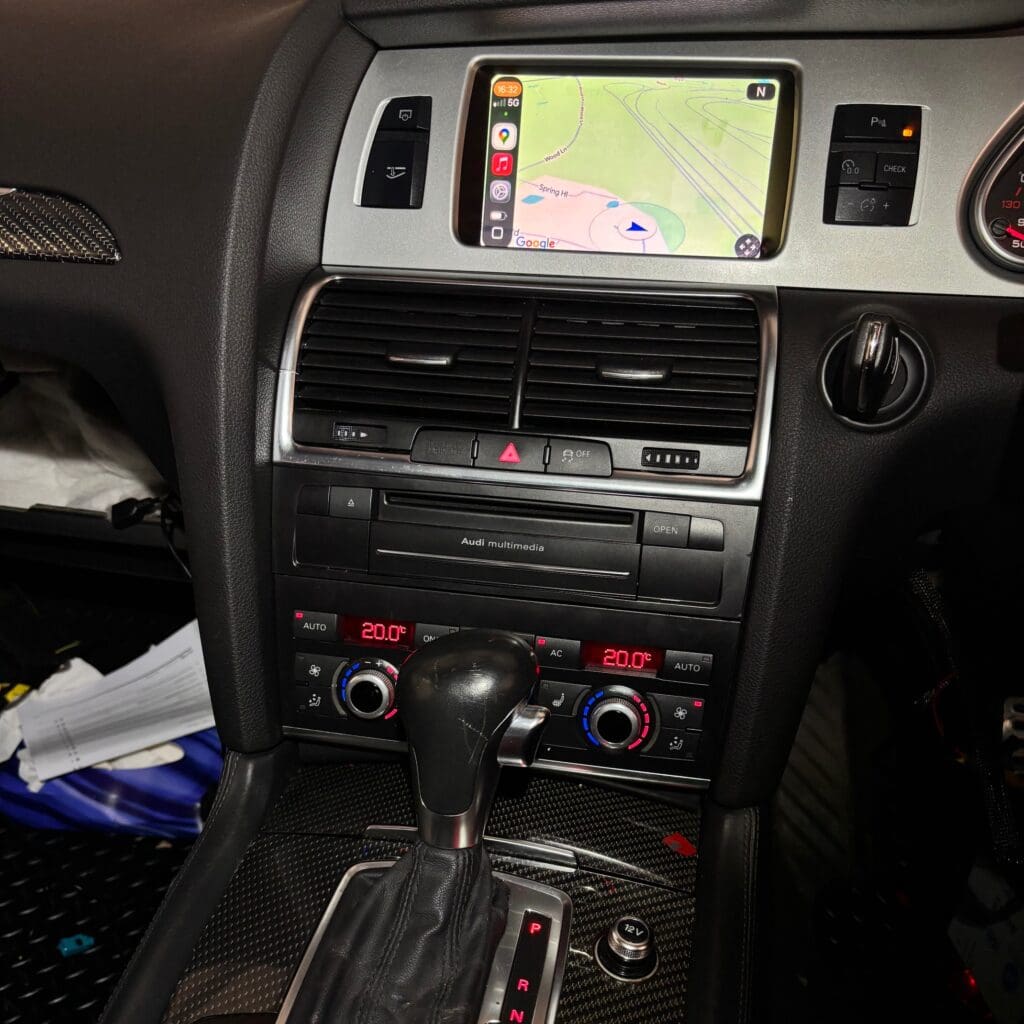
The result is modern smartphone integration that feels OEM because it’s controlled through the original MMI interface. Want the convenience of wireless, but still like having a cable option for charging and stability? This setup supports both.
What the customer wanted
The brief was simple: add proper Apple CarPlay and Android Auto without changing the look of the dashboard. Instead of mounting an aftermarket screen or swapping the head unit for something that never quite matches, we kept everything on the factory MMI screen.
Just as importantly, the customer didn’t want to lose day-to-day functionality. That’s why telephone connectivity mattered: calls still route through the car’s original Bluetooth system, so the experience stays consistent.
Retrofit approach
This job sits right in the sweet spot of vag retrofits: keep the cabin looking stock, while bringing the tech up to date. Because the control method stays OEM, it feels like the car should’ve left the factory this way.
- Apple CarPlay integration on the factory MMI display
- Android Auto integration on the factory MMI display
- Connectivity options: wired via USB or wireless
- Control method: original Audi MMI controls (OEM interface)
- Telephone connectivity retained via the original Bluetooth system
- No dashboard modifications needed
Install and integration
Clean integration is the whole point of this kind of upgrade, so the process focused on keeping everything tidy and factory-like. Since this is a retrofit that lives inside an OEM infotainment ecosystem, we also treated it like proper vag retrofits: integrate first, then confirm behavior through the original controls.
- Confirmed the goal: CarPlay and Android Auto on the factory MMI screen, with no add-on screen and no dash cutting.
- Installed the retrofit solution to enable smartphone projection while maintaining the OEM display and control path.
- Set up both connection modes so the customer can use wired USB or go wireless depending on preference.
- Checked MMI control operation to ensure navigation through menus behaves as expected.
- Verified phone call routing through the original Bluetooth system to retain telephone functionality.
What we verified: CarPlay launches and displays correctly on the factory MMI screen, Android Auto launches and displays correctly, the system can connect both wired (USB) and wirelessly, the original MMI controls manage the interface, and phone calls continue through the factory Bluetooth without losing core functionality.
FAQ and next steps
Q: Will this work on every Mk1 Audi Q7?
A: Compatibility depends on the vehicle’s MMI setup. Send your details and a photo of your MMI screen/menu, and we’ll advise what’s possible.
Q: Can I use wireless and wired, or do I have to pick one?
A: This retrofit supports both wired USB and wireless connectivity, so you can switch depending on what suits the trip.
Q: Do phone calls still work like factory?
A: Yes—telephone connectivity is retained, with calls routing through the original Bluetooth system.
Q: Do you need to cut the dash or fit a screen on top?
A: No. The whole point here is factory-style integration on the original MMI screen with no dashboard modifications.
Q: What should I send when asking for a quote?
A: Your vehicle details, what you want enabled (CarPlay/Android Auto), and whether you prefer wireless, wired, or both.
Customers often travel in for OEM-style infotainment upgrades because they want the finished result to look right and behave like it belongs. If you’re comparing options, it’s worth thinking beyond “does it work?” and asking, “does it still feel factory on Monday morning?”
If you’re considering an Audi Q7 CarPlay retrofit, message us with your Q7 details and what connection style you prefer. We regularly help owners planning retrofit work from Redditch and Birmingham, as well as London, Manchester, Leeds, and Coventry, and we’ll talk you through what’s realistic for your setup before you commit.
Want to see more work like this or discuss what else can be integrated cleanly into your factory systems? Reach out, and we’ll point you to relevant projects and options for your vehicle—especially if your priority is OEM feel rather than aftermarket clutter.
📍 Professional Retrofits Limited
🏠 Unit 9, Station Rd, Higham on the Hill, Nuneaton, CV13 6AG
Follow us on Social Media:
🔵 Facebook
📸 Instagram
▶️ YouTube
Relevant Links: